


Good morning everyone,
Today we are releasing Sysme POS 5.39, an update focused primarily on performance optimisation, improving the user experience and modernising the visual design of the entire Sysme ecosystem.
In fact, this version includes one of the most significant internal optimisations made to Sysme POS in recent years. Much of this work is not immediately visible, but it will make the software faster, more efficient and better prepared for continued development in future versions.
Improvements have also been introduced across Sysme POS for Windows, Sysme POS Mobile, the Sysme POS Mobile app for Android and the different print formats.
Below you will find the main new features and improvements.
What’s new in this version?
Version 5.39 introduces important improvements across several areas of Sysme POS. Some of the most notable changes include:
- Significant internal optimisation of performance and resource usage.
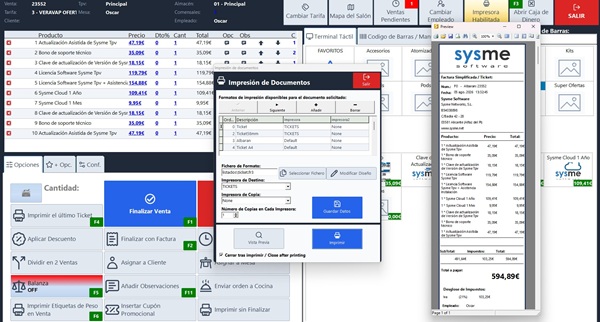
- New unified design across Sysme POS for Windows, Sysme POS Mobile, the Android app and print formats.
- Functional improvements to Sysme POS Mobile and the Android app.
- Optimisation of the room map and refresh processes.
- New features designed to improve day-to-day operation.
New design
One of the main goals of this version has been to unify and modernise the visual design of the entire Sysme ecosystem.
We have reviewed the design of all visual elements across:
- Sysme POS for Windows
- Sysme POS Mobile
- Sysme POS Mobile app for Android
- Print formats
The aim has been to provide a cleaner, more consistent interface adapted to modern devices, while maintaining the simplicity and speed of use that characterise Sysme POS.
Performance improvements in Sysme POS for Windows
This version includes significant internal optimisation of the software.
We have reviewed and improved the dynamic creation processes for components such as:
- Category buttons
- Subcategory buttons
- Product buttons
- Room map elements
- Open sales
- Other interface components
These improvements considerably reduce unnecessary database calls and optimise memory and processor usage, resulting in a smoother and more efficient application.
New room map refresh system
The room map has also been optimised.
Until now, the entire map was redrawn whenever a change occurred. From this version onwards, only the elements that have actually changed are updated, such as open sales or changes to table status.
The result is much faster and smoother operation, particularly in establishments with a large number of tables.
Improvements to the Sysme POS Mobile app
The Android application includes several improvements designed to increase stability and ease of use.
These include:
- New connectivity control with the POS terminal.
- Improved interface adaptation to prevent interference with Android system elements.
- New option to prevent the device from turning off the screen or going into sleep mode while the application is in use.
This last improvement is particularly useful in hospitality businesses where the application remains open throughout the working day.
Improvements to Sysme POS Mobile
The web version of Sysme POS Mobile also includes important new features.
Automatic parking of forgotten sales
A new control system has been introduced to detect open sales that remain inactive for an extended period.
If a sale remains open (without being parked) and no action is performed for 2 minutes, Sysme POS will automatically park it.
This prevents forgotten sales and improves the organisation of day-to-day work.
Room map optimisation
As with Sysme POS for Windows, the room map now refreshes only the relevant changes, avoiding complete redraws and considerably improving system responsiveness.
Other improvements
This version also includes several smaller changes that improve everyday use:
- New button to delete the last character entered using the touch keyboard.
- Employee permissions relating to sales with quantities equal to or below zero now also apply to keyboard shortcuts.
- The customer-facing display now shows the quantity or weight detected by the scale before the sales line is added, providing greater transparency during the sales process.
Update options
From version 5.36 onwards, new versions of Sysme POS can be installed using an update key or through an assisted update.
1. Update using an update key (economical option)
Recommended for users who prefer to carry out the update themselves.
Requirements
- Sysme POS 5.36 or later must already be installed and working correctly.
Steps
- Purchase the update key:
https://www.sysme.net/tpv/actualizaciones/Clave-actualizaci%C3%B3n-Sysme-Tpv
- Follow the instructions in the update manual:
https://www.sysme.net/sysme-tpv/manual-del-usuario/instalacion/actualizacion-de-version/
2. Assisted update by our technical team
Recommended for users who:
- Are using versions earlier than 5.36.
- Prefer the update process to be carried out by a technician.
- Want additional peace of mind during the update.
The service includes:
- Pre-update review.
- Backup.
- Installation of the new version.
- Final verification that the system is working correctly.
Purchase an assisted update:
https://www.sysme.net/tpv/actualizaciones/actualizacion-asistida
Important
Revisions or patches released within the same version will continue to be completely free of charge.
For example, all users who update to Sysme POS 5.39 will subsequently be able to install any 5.39.x revision without purchasing another update key.
These revisions will mainly include:
- Bug fixes.
- Stability improvements.
- Minor technical adjustments.
Thank you for your trust and for continuing to be part of Sysme.
