


Good afternoon everyone,
We are releasing a new review of Sysme POS 5.39, and once again this is an update whose scope goes well beyond a conventional review.
With version 5.39, we began an in-depth review of Sysme POS with a very simple goal: to take advantage of everything we have learned and developed over the years and make the software what we really want it to be, not only by adding new features, but also by reviewing operations that could be improved, optimising processes and completing work that had been pending for too long.
Over the last few weeks, we have been able to accelerate this process considerably, and we have decided that all these improvements will remain part of Sysme POS 5.39 at no additional cost to users who have already updated to this version.
This new review continues that work and includes significant improvements to both Sysme POS for Windows and Sysme POS Mobile.
Calculated total and documented total in receipts and invoices
Over the years, we have received occasional queries, particularly from hospitality and food retail businesses handling large quantities of low-priced products, regarding small differences of a few cents when viewing historical sales totals.
These differences can occur as a result of the rounding required when working with prices before tax.
When a receipt or invoice is completed, the final amount of the document must necessarily be adjusted to the precision of the currency being used. However, when subsequently calculating the total of a large group of sales from their individual lines and taxes, the accumulation of small fractions can result in differences of a few cents compared with the sum of the final documented amounts.
From this review onwards, Sysme POS clearly displays both values when searching receipts and invoices:
- Documented total: the sum of the final amounts recorded on the receipts or invoices.
- Calculated total: the amount obtained by recalculating the information from the selected sales.
This makes it possible to immediately identify the origin of any small difference and provides both values depending on the type of query being performed.
Pagination and search improvements
We have added pagination to the receipt and invoice search tools, improving performance and navigation when working with histories containing a large number of documents.
We have also added a timer to the search filters for:
- Receipts.
- Invoices.
- Reports.
- Products.
This prevents unnecessary searches from being executed while the user is still entering or modifying the search criteria, resulting in a smoother response and reducing unnecessary database queries.
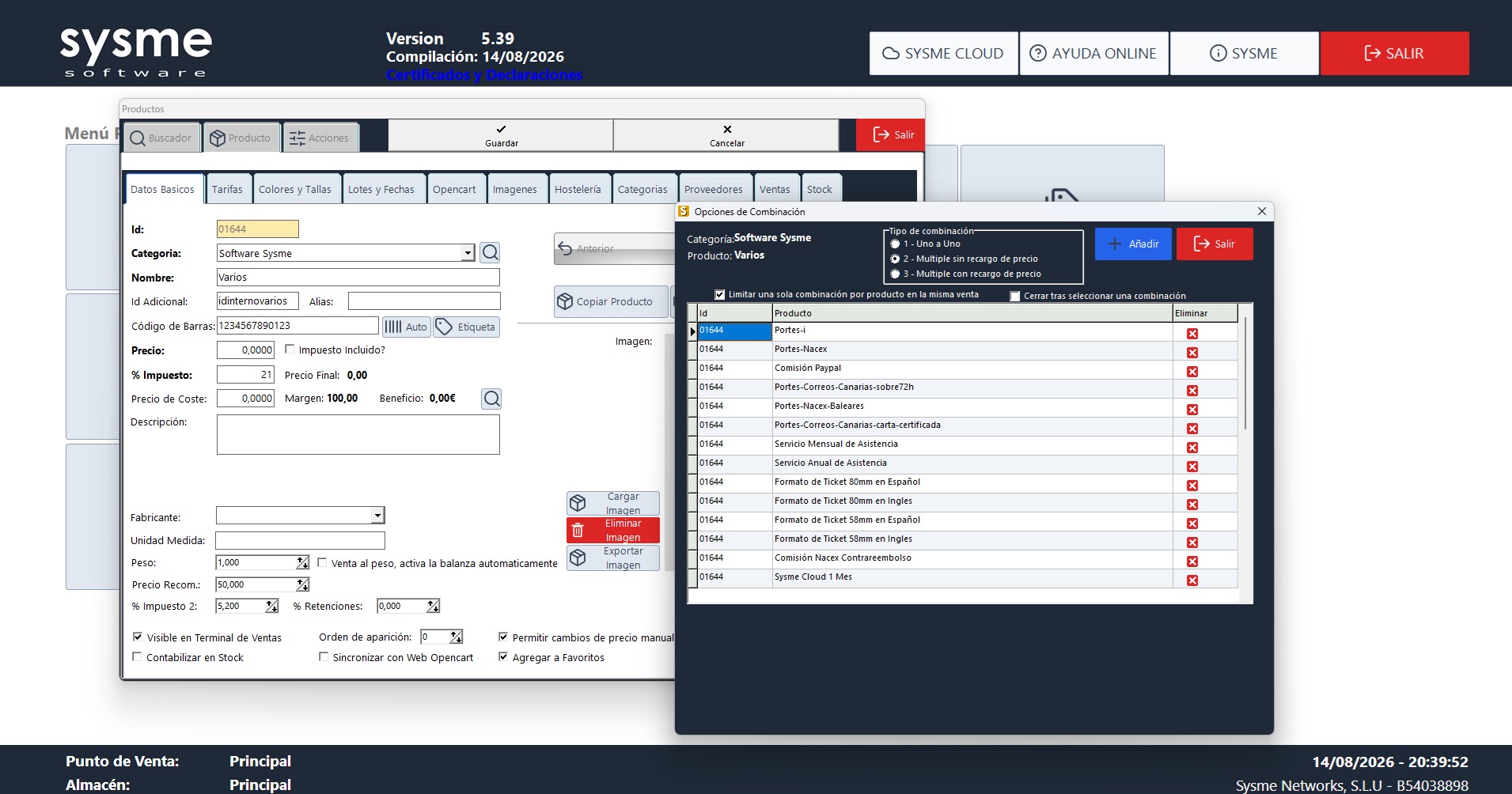
Product combinations completely revised
This has been one of the most important areas of work in this review.
We have carried out an in-depth revision of the product combination system, both in Sysme POS for Windows and Sysme POS Mobile.
The system can now correctly handle multiple levels of combinations, keeping products properly positioned and grouped within the sale.
The new operation covers the different possible scenarios:
- One-to-one combinations.
- Multiple combinations.
- Combinations with line increment.
- Combinations without line increment.
- Multi-level combinations.
The aim was to ensure that the selection and presentation of combined products remained consistent regardless of the complexity of the combination.
The revision has been particularly significant in Sysme POS Mobile, where we have rebuilt a large part of this functionality to reproduce the same behaviour available in the Windows sales terminal on phones and tablets, including navigation through the different selection levels.
One-to-one combinations are now integrated into products and price lists
We have also improved the management of products used in one-to-one combinations.
From this review onwards, these products can be displayed in the product list, allowing their price to be modified directly without first accessing the combination configuration.
In addition, these products are now visible in price list management, so special prices can be assigned to them in exactly the same way as to regular products.
This makes price management considerably easier for businesses that make extensive use of product combinations.
Improvements to cancellation and kitchen order printing
We have carried out another review of the printing processes related to:
- Cancellations.
- Kitchen orders.
We have corrected several scenarios that could still cause incorrect behaviour with certain printing configurations.
Clearer kitchen course groups
We have restored and improved the sales terminal function that allows products to be assigned to different kitchen course groups.
We have also replaced the generic names previously used —Block 1, Block 2, etc.— with much clearer names for everyday operation:
- Starters.
- First courses.
- Main courses.
- Desserts.
These names are available in both Spanish and English.
New employee permission for printer control
We have added a new employee permission that controls who can view and use the button to enable or disable the printer from the sales terminal.
This allows administrators to prevent certain employees from accidentally changing printer status during service.
Sysme POS Mobile and Google Play
We are also continuing to work on the internationalisation of Sysme POS Mobile.
The application available on Google Play now includes English, and we have reviewed various translations throughout the software to improve consistency between the Spanish and English versions.
We have also made several display and layout adjustments in both Sysme POS for Windows and Sysme POS Mobile.
More improvements and internal adjustments
As has become usual during the development of Sysme POS 5.39, this review also includes numerous smaller adjustments made during testing and everyday use of the software.
We continue to review processes, interfaces and operations that have been part of Sysme POS for many years, using each review not only to correct problems but also to simplify and improve anything we believe can work better.
Free update for Sysme POS 5.39 users
This update is part of Sysme POS 5.39 and is completely free of charge for all users who already have this version.
If you already have Sysme POS 5.39, you do not need to purchase another update key.
Simply download the latest Sysme POS review and install it by following the usual update procedure.
With this review, we continue to complete the work started with 5.39, and we would especially like to thank all the users who have supported Sysme POS over the years and continue to trust in its development.
Thank you, as always, for continuing to be part of Sysme.
